Showing posts with label iphone. Show all posts

Skype for iPhone gains TV video call support


So you have an iPhone and love using Skype? Well jump into the App store and either update or download the newest verison of Skype (3.0.1). This new update will allow you to make video calls directly to certain Samsung and Panasonic model TV’s that support Skype for TV. It’s a free download in the App store, so have some fun.

Source:(SmartPhoneEnvy)

Verizon iPhone 4 now available to order / reserve for in-store pickup


Apple and Verizon's long-awaited partnership is nearly upon us, folks, and the final piece to the puzzle is general availability of the hallowed iPhone 4. You're now able to order or reserve your own at the online stores of both carrier and phone maker, though shipping dates for early orders are listed at a distant February 18th. We'd just reserve one and go down to our nearest physical outlet to pick it up tomorrow

Source:(engadget)

Windows Phone 7's "data bug" affects the iPhone, too


Unless you've been hiding under a rock, you've heard about the so-called Windows Phone 7 "data bug" and Microsoft's response to it, with Yahoo firing back an explanation pinning Microsoft's implementation as the problem, claiming that only Windows Phone 7 devices suffer from this issue. Rafael Rivera, the one who first confirmed Yahoo! Mail as the cause, was not thrilled by Yahoo's answer.

An iPhone was used to pull data through the same monitoring script that Windows Phone 7 was run through, and the results? Almost the same, with Yahoo's servers returning an exceedingly lengthy reply to a request for message flags, consuming significantly more data than necessary, and causing the same problem as seen on Windows Phone 7.

You can read the technical bits on his blog here, but the important thing is this: The Windows Phone 7 data bug was a big deal, but did not necessarily need to be. Sure, Windows Phone 7's constant updating of data could lead one to large data charges, but with any smartphone, auto updating has caused numerous billing overcharges in the past. Whatever the reason why WP7 took the fall, call it a pride deal, but for us, we're considering this as an example of public hysteria. As for Yahoo, let's hope they fix their servers sometime soon.

Source: (WP7Central)

Visa Brings NFC To European iPhones


You don’t need an NFC-equipped iPhone 5 in order to make mobile payments in Europe. Visa is launching its Visa Mobile service in Europe, offering an external dongle for iPhone owners to use to get in on the action.

The Wireless Dynamics iCarte accessory is available through banks and mobile operators, and with the help of a Visa application from the App Store adds near-field communication (NFC) abilities to your iPhone.

Near-Field Communication is a type of wireless technology that allows one device to communicate securely and wirelessly with another by simply tapping the two together. The technology is expected to be used for mobile payments, and the functionality has already been included in a number of Android phones. With the iCarte accessory, European iPhone users can simply tap their activated dongle on a contactless-enabled point of sale terminal in Europe to make payments, eliminating the need to carry their actual Visa cart with them.

Many European retailers already support NFC technology, including all 1,200 McDonald’s locations in the UK. Apple is rumored to be including the technology in its next generation iPhone and iPad, but this dongle makes it possible for current iPhone owners to take advantage of the technology before that happens, or even after without having to update their handsets.

Mobile payments look to coming–and fast. What do you think about NFC technology? Can you see yourself using it?

Source:(TechnoBuffalo)

Microsoft releases OneNote app for iPhone, free for a 'limited time'


Well, here's something of a surprise -- Microsoft has just brought its OneNote app to the iPhone, and it's made it available as a free download "for a limited time" to boot. As with the Windows Phone 7 app (previously the only mobile version), the iPhone app will let you manage notes and shopping lists (and even add pictures taken with the iPhone's camera), and then sync those with Windows Live SkyDrive so you can access them in either the Windows desktop application or its web-based counterpart. As ZDNet's Mary Jo Foley notes, however, perhaps just as interesting as the app itself is the question of what else might follow -- a native OneNote app for iPad, perhaps, or even iOS versions of other Office applications? Microsoft unsurprisingly isn't commenting on those possibilities, but it did note that the OneNote app is the culmination of some 18 to 24 months of development from a team of Microsoft Mac Office and OneNote engineers, which is either a sign of some serious slacking or a fairly significant commitment on Microsoft's part. No word on when the "limited" free period will run out (so you'll probably want to grab it while you can), nor is there any world on a worldwide release -- it's currently only available to US users, unfortunately.

Source: (engadget)

Control your Apple iPhone with your brain waves

Imagine a world where the touchscreen is passe and smartphone owners use their brainwaves to navigate around the screen. Well, that future is here now thanks to a company named PLX Devices. The firm has developed the XWave brainwave detecting headset for mobile devices.
As PLX says on its web site, the headset "can sense and detect human brainwaves, interpret them and connect it to everyday technology." The device looks like the headsets that telephone operators used to wear and costs $100 and the company offers apps for iOS devices only for the current time. There are 4 apps available now-the basic set-up app, an app that will "upload your song list and sync your brainwaves with any song in your library", a "Tug of Mind" app; and one for meditation. The company says that the headset is harmless because it listens to brainwaves and does not transmit any signal.

So what does the future hold for such technology? On its web site, PLX says that in the future, "you will be able to control and float objects in video games by simply thinking about it, or train your mind to focus and relax on command." Company founder and CEO Paul Lowchareonkul says, "The human brain is the most powerful, complex thing in the universe, and for the first time, we're able to harness its amazing power and connect it to everyday technology. With the development of 3rd party apps, the potential for innovation is limitless." For more information on the XWave headset, check out the sourcelink.


Source: (PhoneArena)

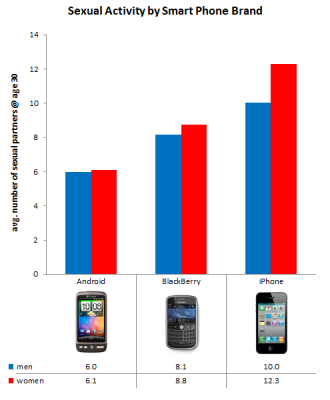
Android users supposedly getting less sex than iPhone, BlackBerry owners


... And I call BS, but more on that later. So, the folks over at OkCupid just put up an interesting article about ways to avoid "being ugly." From their data as seen above, they are recommending that users steer away from Android devices because Android users seem to get less action than their iPhone (and BlackBerry) counterparts. Who knows, maybe it is because we have porn. Join me past the break and we can discuss this a bit more, shall we?

Via: (Android Central)

Security Vulnerability Found on Latest iPhone 4/iOS 4 Jailbreak


While the new iPhone 4 jailbreak is relatively easy to perform and can get users up and running in no time to add new features and functions to their iPhone, the process does expose a security vulnerability that would make it easy for thieves and malicious hackers to steal your messages, phone book, and other items. Even if you're not on an iPhone, you're not safe as your friends who have a jailbroken iPhone with your information on it can leave your information vulnerable.

According to BGR, the exploit works by taking advantage of the PDF viewing capabilities:

This is done through the jailbreakme PDF exploit. Under this method, it would be possible to steal your address book, text message database, or much worse. There is going to be a security solution soon though, as BGR has been informed that a plugin named PDF Loading Warner” has been created to combat this potential security risk. It works by hooking into the device system and will display a warning before a PDF can be displayed. If you install this plugin and navigate to a website that should not be showing a PDF and get this warning, you are able to click “Cancel”, blocking the PDF from loading and subsequently stealing your data.

The forthcoming patch does not patch up the vulnerability in iOS 4, but rather give users more control, much like how desktop operating systems now ask if you want to run an executable program.

Via: (PocketNow)

24 Hours Later: A Jailbroken iPhone 4 (Video)


It's been about 24 hours since I've jailbroken my iPhone 4. This is my first jailbreak experience, and while the actual jailbreaking was super easy, the aftermath was a bit confusing. After you jailbreak, you get an icon on your homescreen that launches Cydia, an repository of "packages" that include a vast array of apps that can tweak your phone. It's really up to you to figure out which packages to install, but with a little searching and asking on Twitter, you'll soon be pointed in the right direction.


On the iPhone 3GS and previous iPhone devices, jailbreaking often meant having to deal with a slower device with reduced battery life. The iPhone 4, thanks to the boost in battery capacity and CPU speed, can handle more tweaking than its predecessors. In the last day, I've noticed that my device is slightly slower and more power hungry, but not enough to impact usability.

So what have I done thus far? I've used IntelliScreen to allow me to see email previews right from my lock screen, MyWi to turn the iPhone into a WiFi router, WinterBoard to load themes, SBSettings to enable an easy way to toggle on various system radios, MIM to change the carrier name in the upper left corner, and Five Icon Dock to increase the number of allowed icons in the dock to five. Most of what I've done so far has been to make iOS feel as usable as Android and Windows Mobile, which can do many of the things I mentioned above out of the box (or without rooting/unlocking/HardSPL'ing). I'm looking forward to exploring more of the wonders of jailbreaking over the coming weeks.

Have you jailbroken an iOS device before? If yes, what are some must-have tweaks that have made a big difference in that usability of the device?

Via: (PocketNow)

I've Jailbroken my iPhone 4 (Update)


Perhaps you heard: the iPhone Dev Team has jailbroken the iPhone 4. I've always been interested in jailbreaking, but have never gone through with it. From what I've seen from others that have taken the plunge, you can fix literally every omission in iOS with a utility that can be downloaded once you jailbreak. Want a quick way to turn on and off WiFi and Bluetooth through a tap of the notification bar? Jailbreak. Want to see previews of your new emails or SMS on the lock screen? Jailbreak. Want to spruce up your iPhone with a new theme that changes icons, graphics, and more? Jailbreak! It's really compelling stuff that can breath new life into your iOS device and not make it feel so...confined to Apple's idea of how a device should behave. And hey, it's legal now.

It seems that on the iPhone 3GS and below, jailbreaking also meant that your device would be slower and have worse battery life when compared to stock, especially after installing a bevy of software. The iPhone 4 has a bigger battery life and faster CPU, so the opportunity is rife.

Jailbreaking has become stupidly easy. The latest version from Comex entails you going to a website on your iOS device, hitting a button, and waiting five minutes. Just open Safari and go to JailbreakMe.com, slide the slider, and boom, you're there.

You should know that jailbreaking with this current version will make MMS and FaceTime inoperable on your device. Also, it'll void your warranty, but apparently un-jailbreaking is as easy as doing a software restore.

What have I done so far? Not much--I have a lot to learn. For starters, I've loaded a theme that has removed the labels from my icons, as you can see above. It's a start. Once I get the hang of this, I'll keep you informed of my experiences as jailbreakee.

Have you taken the plunge?

Update: Wow, the wonders of jailbreaking! Here's what I've done in the last hour.


Expanded the four icon dock on the iPhone to five. Also, grabbed MyWi which allow you to do WiFi tethering.


Used IntelliScreen to add some very useful widgets to my lock screen: new email messages, and weather.

Via: (PocketNow)

Not Sure Which Jailbreak Works On Your iOS Device? Here's A Matrix


Here's one of those keeper sites that should be on every iOS device owner's bookmarks tab. With so many Redsn0ws, Blacksn0ws, Spirits and all sorts of names that sound like Frosty The Snowman for Jailbreaks in the market, it can prove to be a challenge for you to know which one is good enough to do the trick for your iOS device.


Lucky for us, someone already did the hard work of figuring things out and was kind enough to build us a free matrix that holds the details. From Jailbreaks to unlocks, from the iPad to the iPod Touch 1st Gen, from iOS 1 to every single release to date, from iTunes 8.2 to the current one, the matrix holds every single detail and even gives you a link to download the corresponding Jailbreak or Unlock software. It seems the developer has done a fantastic job in keeping things to date so I'd personally consider this the most reliable, go to source, for a smart hack.

The whole thing is free, so just head on over to JailbreakMatrix.com and start shaping up that iOS baby the way it should've been from the start, as long as you don't mind the risk..


Via: (PocketNow)

Galaxy S I9000XXJP3, here is the latest IOS. Sorry to Frøya!


What Galaxy S is aesthetically similar to iPhone no doubt. Galaxy D which has an interface Touch Wiz 3.0 reminiscent of the iPhone UI is clear. But the arrival of the new beta of I9000XXJP3 Frøyaor seem to lead towards a similarity almost embarrassing.

Think you have the functionality of IOS on a system Android Frøya, with video calling, hardware similar to the iPhone 4 and all of the software introduced with the Touch Wiz is a really strange effect.

No denying it, the copy is clear. What's Wrong With a copy of what happened and propose a system among the best on the market?

So here we will soon see what the next version of Galaxy S.

* System of selection, copy and paste very similar with a magnifying glass or zoom box


* Same graphics for the context menu with the difference that S Galaxy offers more options. Share it lets you share with Gmail, SMS or Bluetooth (and sure Twitter and other software very soon, or if installing third-party programs) the selected text. The search shows rather good choices:


New icons for programs and in particular for the notification system.


As we can see has been implemented reporting unread SMS with the meter (this far only Samsung app store). Most likely the flow will also feature on Mail, Telephone and Facebook is on the Market Samsung.

* Screenshots! News really important. The images you see we made with our Galaxy S without Root. How many will root without the screen are not possible, but Samsung has implemented a system to create iPhone-style screen shots.
o Holding the back button (arrow) and press and hold the back, home button, a screen will be saved in the folder PNG screenshot 8GB.
* New icons for the layout of the screen power off:


News Finally, for the Task Manager that we saw in the last Roma capabilities have been added for the control of RAM and active processes


What about .. This was the third beta in less than 24 hours for Galaxy Frøya S and every time the news are many. Still the work is hard and the rom does not offer any new features that Frøya introduced mainly at the kernel level, JIT compiler and overall speed. The road taken and the news we like to have this pattern, S Journal Frøya for Galaxy will change the face on the telephone.

Via: (HDblog)

Apple investigating issues with iOS 4 upgrade on iPhone 3G


Back when we outlined the iOS 4 features missing from iPhone 3G, we forgot one key bullet point: performance. As more and more two-year veterans of Apple's phones have taken the plunge and upgraded to the latest firmware, slowdown and battery drain issues have become a common complaint, which is even more irksome when you think of just how little the update really adds to the UI. The Wall Street Journal reports speaking to an Apple spokesperson who said the company is looking into the matter. That doesn't necessarily mean a fix is coming anytime soon, but hey, at least you can hold the darn thing however you want.

Via: (Engadget)

iPhone 3G vs. iPhone 4: detailed comparison of battery life!


Continues even today our mini book dedicated to the comparison between iPhone 3G and iPhone 4. In the days before we showed the differences of the camera and the wireless reception, but today we focus on a fairly critical point: The actual battery life. Exit 3GS were very users who complained about poor battery life that reaches the minimum percuentuale few hours of use.

Today we compare the iPhone battery 4 and iPhone 3G.

The test was conducted during a day, simulating normal use of the device. During the test devices were set exactly the same type of way:

* Push Email Notifications Active
* Wi-fi always on
* Brightness set to 60%
* Off screen automatically set to one minute
* Bluetooth always off
* Active localization
* Both devices have 4.1 installed IOS

We started our test at 00:50 (4 el'iPhone the iPhone 3G has set the time for two minutes then busted we consider the minutes in the middle) with the terminal first left off with the percentage of the battery at 0% and then recharged up to 100%.


At this time we launched the iPod application on both devices, synchronized with music and set the exact same sequence of random tracks. We then set the alarm for 8:30 am. Before leaving the devices on all night with your iPod, iPhone 4 we note that the percentage falls to 99%.


In the morning, exactly at 8.30 stopped the iPod. We then simulated by about 7 hours listening to iPods. The percentages that you will have marked the rest of the day already and now we find out who the winner of the test. The iPhone 3G after playing music for about 7 hours (with screen standbay) has reached 66% of autonomy against well 83% of the iPhone 4. The test would have already been concluded. A gap of almost 20% is a lot. However, we have finished simulating the duration of both batteries.


From 8:32 to 9:13 we made:

* calls on both devices than a minute
* SMS
* 4 and reading mail


From 9:13 to 9:37 we left the phone in the meantime arrived and stanbay different email (unread). From 9:37 to 10:25 we have:

* Sleeps 5 email
* sailed through the application Youtube videos watched 3 complete

Hours 9:37


10.25 am


From 10:25 to 10:56 the phone has received only unread mails.


As noted, the difference was always about those 20 percentage points due to first test with the iPod. It is also true that for now we are doing operations that require intensive use of resources and then the battery.

From 10:55 to 13:00 we have:

* Made 2 calls for 2 minutes each
* 4 sms
* reading email 10
* played exactly 5 minutes to Let's Golf 2 Gameloft

The rest of the time iPhones have been in standbay a black screen.


13:06 hours: Game Updates Pro Evolution Soccer 2010.


13:10 am to 13:48 pm We have:

* Tried updating Pes 2010 for 10 minutes
* Played for another 15 minutes to play Real Tennis 2009


From 13:48 to 14:21 we have:

* Posted 1 message
* Made a call 30 seconds


From 14:23 to 14:39 we have:

* Launched the Navigator Sygic Aura Italy and set a course near to our staff. We then reset the route to the editors. We start taking the navigator on for about twenty minutes.


From 14:39 to 16:58 the iphone have always remained in Standbay apartments:

* Reading mail ten minutes
* A 1 minute call
* 3-4 minutes of web browsing
* and another call for 1:30 minutes


From 16:48 to 17:58 we have:

* played 10 minutes let's Golf
* Bedroom 2 email
* and sailed on safari for 10 minutes


From 18 to 19:09 we have:

* Watched a video on Youtube
* sent a text message
* Hamlet 2 email
* 5 minutes to play Angry Bird


The text was finalized when the iPhone 4 still had 30% battery! All transactions listed have been done with a lot of indiscretion on both devices, without damaging neither the one nor the other. It is indeed a test and not un'elogio by Apple for developing a better device.

Via: (HDblog)

Apple iOS 4.1 beta 2 now available for developers


Developers, developers, developers: Apple is now seeding the second iteration of the iOS 4.1 beta your way. It's been just shy of two weeks since beta 1 hit the scene, which is about on par with the pace of revisions for previous beta releases. We haven't had a chance yet to dive in and see what changes are afoot, but we're downloading now and will be sure to let you know if we notice anything.

Via: ()

Speed test between iPhone 2G, iPhone 3G, iPhone and iPhone 3Gs 4 (video)


Here's an interesting comparison to note that in four years Apple has been working on components and optimization to create an iPhone every year with better performance. The comparison will exam the '2G iPhone, the 'iPhone 3G'siPhone 3Gs the last one iPhone 4. The test will be open starting the game "Plants vs. Zombies" and then applying that change when you start Google Earth, Seadragon and Safari. Nice is the difference between iPhone 2G and iPhone 4.

Video to follow.


Via: (HDblog)

Jailbreaking, Rooting, and Unlocking Gets Legalized in DMCA


The US government has legalized jailbreaking, rooting, and the unlocking of cellular telephones by adding the respective provisions to the Digital Millenium Copyright Act among the many new exemptions added to relax the stringent copyright laws. Additionally, AppleInsider reports that other exemptions announced Monday allow people to break protections on video games to investigate or correct security flaws; allow college professors, film students and documentary filmmakers to break copy protection measures on DVDs to embed clips for educational purposes, criticism, commentary and noncommercial videos; and allow computer owners to bypass the need for external security devices (dongles) if the hardware no longer works and cannot be replaced.

In regards to jailbreaking, the DMCA now says "Computer programs that enable wireless telephone handsets to execute software applications, where circumvention is accomplished for the sole purpose of enabling interoperability of such applications, when they have been lawfully obtained, with computer programs on the telephone handset."

Jailbreaking is the process used on the iPhone and iOS devices to allow apps that may not have gain Apple's App Store approval to operate on the device and unlock other features of the iPhone that are not officially made available, such as call blocking applications and adding a "Today screen" to the lock screen of the iPhone as well as customized widgets. The process of similarly unlocking powerful features is known as rooting on Android OS devices. Additionally, unlocking a handset will allow users to bring their GSM-compatible handsets to another carrier. In the US, AT&T iPhones could then be unlocked to use on T-Mobile though since the iPhone only supports AT&T's 3G networks, unlocked iPhones would only work on T-Mobile's EDGE network for data

Via: (PocketNow)

CP Design's iPhone Game Pad prototype does Donkey Kong Country right


With the iControlPad seemingly slipping further and further from reality, iPhone gamers with an affinity for buttons have fewer reasons to get out of bed in the morning and face the world. If that's you then it's time to wake up, Sunshine, because the iPhone Game Pad is here to bring a little light to your life. It's a somewhat chubby slip-on case that, as of now, works only with the original model iPhone. (There's a 3G/3GS model to come.) On the face it offers four primary control buttons plus a D-pad, what appears to be Select and Start buttons, plus a pair of shoulder buttons atop. This combination should make it perfect for emulation hounds or any 'ol heathen who values tactility over design purity. As of now it's just a prototype, but if you have the resources to bring this thing to production the folks at CP Design who crafted it would surely love to hear from you.


Via: (Engadget)

iPhone Coming to T-Mobile USA in Q3


A popular Mac blog is reporting that the iPhone may be headed to GSM carrier T-Mobile USA in the third quarter. Although T-Mobile is a GSM operator with a growing 3G network, its AWS deployment is not compatible with the radios found on the Apple smartphone which is currently compatible with AT&T's network. The source says that (s)he is 80 percent certain that the iPhone will hit T-Mobile in Q3.

For its part, T-Mobile parent company Deutsche Telekom has not been shy in aspiring to bring Apple's popular smarphone to its network by the end of the year.

With high demand of the iPhone and a msas rollout of the device in multiple countries globally, anything is possible, but it may not be likely if Apple has to retool the T-Mobile-specific device for 3G compatibility.

Via: (PocketNow)

Handy Light for iPhone's dirty little secret: tethering (update)


You may ask yourself, why on earth would anyone pay 99 cents for an iPhone app whose sole purpose is to flash bright, solid colors? We certainly wouldn't recommend it, but Handy Light has a great little Easter egg that undoubtedly doesn't jive with the folks at Cupertino HQ. Like Nullriver's Netshare app before it, this little piece of software allows for SOCKS proxy tethering, without having to sign up for AT&T's tethering plan. Instructions available via the video below, and if you're looking to pick up the app yourself, better hurry -- we can't imagine Apple will let this one stay in the store for very much longer.

Update: Looks like the app's been pulled. Ye who snoozes, ergo must lose. If you did manage to nab and the video below isn't working (we see it just fine), check out App Shopper for more detailed, text-based instructions.


Via: (Engadget)