Showing posts with label hd2. Show all posts

HTC Outs Peep Security Update For Certain WM Models


Last September, HTC's integrated Twitter client Peep stopped working because Twitter's switch to a new authentication method called OAuth. Three days later the app started working again, being allegedly fixed by Twitter itself (we believed it was making an exception in Peep's regard).

Last week reports of a security leak surfaced concerning Twitter passwords being leaked and a fix, at least at that time, was offered by HTC on-demand in the form of a secure Peep application.

The Taiwanese manufacturer released an update for the HTC Touch Pro2, HTC HD2, HTC Touch Diamond2 and HTC HD mini which is apparently a security update for Peep. It might even be the secure version we heard about before being available on-demand. To apply the update, hook up your device to your PC and let it sync, download the update, transfer the EXE file to your device and run it. Being a software patch, you will need to reapply after a Hard Reset.

Source: (Pocketnow)
Via: (HTC)

HD2 faster than the 'HD7 phone with Windows 7, another


We have already shown in other video from HDblog, shot when it was published for the first rom WP7 HD2, which in many transactions 's HD2 is faster than the' HTC that comes already with the HD7 system operating Windows phone 7.

As evidence of this here is another video that compares the two terminals.


Source: (HDblog)

Alleged specs of the Galaxy S 2, Desire HD2, Desire 2 and Wildfire 2 are leaked


Seems like the leaked specs of some upcoming smartphone heavyweights are at our disposal (courtesy of Expasys), so it's time to take a closer look at what these handsets have to offer us.

One of the most anticipated smartphones scheduled for MWC appearance is the successor to the Samsung Galaxy S (for now, it's simply dubbed... Galaxy S 2), and if these leaked specs are to be believed, this powerhouse of a phone will pack a dual-core MSM8260 Snapdragon processor clocked at 1.2GHz (previous rumour claimed this handset will be powered by a dual-core Orion processor), a 4.3-inch Super AMOLED Plus screen with a WVGA resolution (480 x 800), an 8MP rear camera capable of full HD recording and a 2MP one for video calling.

These specs don't sound too bad, eh? Anyway, next in line is the HTC Desire HD2, and it's set to offer the same 1.2GHz processor as the Galaxy S 2, but its resolution is listed as qHD (540 x 960). According to these specs, it will also pack an 8MP camera with full HD recording resolution.

Then we have the HTC Desire 2, which is said to be a single-core powered handset (Snapdragon QSD8250 clocked at 1GHz) with two cameras - the rear is a 5MP one, while the front-facing has 2MP. The screen is listed as a Super LCD one with a resolution of 480 x 800.

And after all these great specced phones... here comes the affordable HTC Wildfire 2. Seems like it will sport a 600MHz MSM7227 CPU, a 3.2 TFT screen with a 320 x 480 resolution and a 5MP camera.

For the detailed specs, check the images below and tell us what you think of this story.


Source:(phoneArena)

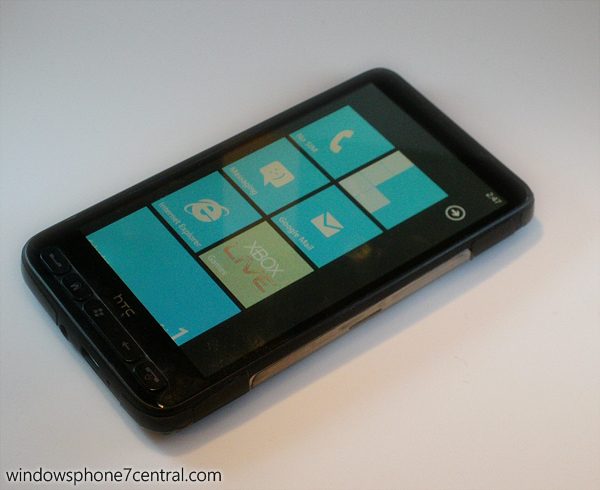
First custom Windows Phone 7 ROMs cooked for the HTC HD2


It looks like a lot of the work put into Windows Mobile is making its way on to Windows Phone 7. Just with Windows Mobile ROMs, the Windows Phone 7 ROM for the HTC HD2 has met the chefs and is now being cooked into custom packages. Two custom ROMs have made their way to XDA Developers: Moon light HD2, and HD2 1.00.00.WP7. Both ROMs come pre-jailbreaked and with some custom features, such as different keyboards and registry tweaks. One of the more shocking changes, however, is the fact that they are cooked to identify themselves as an HTC HD7, and claim to have Live services enabled.

The last part we're skeptical about, as we do not believe it is possible to activate Live services without obtaining a custom PVK from Microsoft. Reading the thread, it appears that most users are having difficulty with Live services, due to the fact that each PVK can only be used a limited number of times.

Either way, it is exciting to see custom ROMs, at least for the HD2, as this will save everyone some time and frustration keeping their settings at optimal levels. Head over to the source link to see the downloads, and let us know what you think

Source:(wphonehacker)

DFT Team Preparing SD Card Version of WM6.5 For HTC HD2


DFT (Dark Forces Team), the ones behind the NAND Android solution for the HTC HD2 -- among other remarkable stuff -- are preparing some more interesting things for all you Leo owners out there.

According to a recent tweet, the team is working on a solution that would allow the smartphone's native operating system, Windows Phone 6.5, to run from an SD Card. The tables could turn: if previously, you could run Android off of an SD Card while your handset was running legacy Windows Phone 6.5, you could now run Android from the device NAND and Windows Phone 6.5 off of your SD Card.

The status of the project is yet unknown and there might be some legal issues involved (but nothing more serious than with the issues of custom Windows Phone ROMs) while Android is still free, but we can't help but wonder: with both Android and Windows Phone 6.5 NAND solutions (the later as legacy) already available, how and in what circumstances would you use the Redmond-platform from your SD card, when (if) available?

Source:(pocketnow)

CyanogenMod7 Gingerbread on the HTC HD2


CyanogenMod, my favorite Android custom ROM, is approaching the Gingerbread Release Candidate phase. This basically means that the entire CyanogenMod Team ("TeamDouche") has been able to port the AOSP source into their framework. It's not quite ready for a "final" release -- they still have some bugs to work through.

What's remarkable about the CyanogenMod source is its framework approach. Developers can "plug-in" the files and configurations necessary for the hardware they're working on, and bring CyanogenMod to a wide variety of handsets.

What do I mean by a "wide variety"? In addition to devices like my T-Mobile G2, the HTC HD2 (a Windows Mobile smartphone), can now run CyanogenMod7.

While the HD2 has been able to run several versions of Android in the past, getting the combined development weight of CyanogenMod behind it means more stable ROMs, quicker.

If you've got an HD2, head over to the link below for more information!

Source: (Pocketnow)

Windows Phone 7 Activation code arrived from a user..

UPDATE
You can see here on video of HDblog.it how to install wp7 on HTC HD2 and a comparison with HTC HD7


You have already read about how to call M$ and take activation code if not you can read this thread on XDA Here


now a user of xda have already post 2 activation code.. and can be used with email (hotmail) now you can have all the service of the M$ without call him you can read more things here

you will do this with your own risk is danger M$ can block your mail if he want..

How to have Android and Windows simultaneously on your phone 7 HD2 (Help)


Once that premise, to have two operating systems simultaneously on our HD2, Android should be on SD. Then you can not have both in memory and Android WP7 Nand.

Having said this, how to create an SD CARD to have a dual boot between Windows 7 and Android on SD ?

As we know WP7 uses a special format for formatting the SD card and you can then simply copy the SD Android phone after you install Windows 7. WP7 will also create a FAT32 partition of 200 mb, but this partition is too small to install android. What to do then? Here is a detailed guide to follow step by step:

Source: (HDBlog.IT)

AthineOS v11 Custom ROM for HD2 Euro (21914)

AthineOS HD2 v11 21914 Sense 2.5.2016
Download HERE (Raoidshare)

Change lOG 21914 12/08/10

*NEW Build 21914
*NEW Chainfire Grapohic Drivers v3.0
*NEW FACEBOOK TAB v1.6
*NEW Message Client 1.8.2017
*more i do not remember now..

AthineOS v11 Custom ROM for HD2 TMOUS wm6.5

AthineOS HD2 TMOUS v11 21914 Sense 2.5.2016
Download HERE (Rapidshare)

Change LOG v11 11/8/10

*New Build 21914
*New Facebook Tab v1.6
*New HTC messaging Client 1.8.2017
*Chainfire Graphic Drivers Update to v3.0
*more and do not remember right now..

AthineOS v11 Custom ROM for HD2 TMOUS

AthineOS HD2 TMOUS v11 23569 Sense 2.5.2016
Download HERE (Rapidshare)

Change LOG v11 11/8/10

*New Facebook Tab v1.6
*New HTC messaging Client 1.8.2017
*Chainfire Graphic Drivers Update to v3.0
*more and do not remember right now..

Metallic Theme, skins for htc HD2


E 'for some time that we report a complete theme to personalize your HTC HD2. Skin created by this interesting Jaguarini which gives it a "metallicao" all 's HD2. The customization includes. Cab file to install automatically and apply the theme, plus the wallpaper you can download as well as all the icons.

The theme can be downloaded in its first version in the works but subsequent releases to be compatible for those who do not use for example the tab Co0kie home etc ...

Info, pictures and other downloads Metallic Theme by Jaguarini

Via: (HDblog)

Android on HD2, Autostart automatic


Now that the distributions for Android HD2 are and will always be more stable and functional, you may want to start quickly implement features android, or even preferred as the operating system starting.

After having thus shown the dual boot, now is the other two utilities. An Android to load automatically and depending instead simply puts two icons in the start menu to quickly select and run 's Android prefer that we see in detail ...The first option consists of a simple. cab (I have not yet then tested better before you try to do a bk), which also modifies the registry and automatically starts android (and throwing ClrCad.EXE HaRET.exe) independently switched. If the files are not found on the SD automatically Windows Mobile.

Warning Author:

WARNING! May cause Windows Mobile to Become inaccessible if installed on a phone with only internal storage!

So, just in case there are problems in starting andoroid just momentarily remove the memory card from 'HD2 and start Windows Mobile.


Info and download Droidboot-Autostart


Otherwise, much easier, in addition to a solution to quickly launch Android when you're already in Windows Mobile. The program installs two simple icons in the start menu, if you want to launch a version of Desire (which we know to be put in the main dir of the memory card) while the other icon launches Frøya 2.2 (which is in practice that is always perceived in memory card but copying the entire folder in the Android sd).

The program automatically launches the file and right ClrCad.EXE HaRET.exe

Info and downloads for 2App Loader Android HD

Via: (HDblog)

HTC HD2 Annually Recurring Calendar Appointments Update


Looks like HTC gets involved and offers continuous support for the HTC HD2 through their Support website, today releasing a second update this month after the re-release of the New SMS Function Update.

Today's update is called Update for HTC HD2 Annually Recurring Calendar Appointments and it is only applicable to International HTC HD2 devices (sorry T-Mobile HTC HD2). According to the description, "this update for HTC HD2 allows you to set recurring calendar appointments year on year". Well, to be completely honest, I don't quite use the Calendar on my HD2 to set up Appointments (I do that by setting them up on either of my PCs through Exchange so they get synched) but before applying this update, I was able to create an appointment on my HD2 that would repeat every July 28. Tell us your thoughts in a comment below!

As for installation, the procedure's the same: download the exe to your Device and run it from there. It will Soft Reset when finished. You'll have to reapply after a Hard Reset though.


Via: (PocketNow)
Source: (HTC)

How to Run Android 2.2 Froyo on Your HTC HD2 (Video)


Froyo isn't available for most Android phones yet, but that doesn't mean that you can't get it on your HTC HD2! We've already shown you a couple of versions of Android running on the HD2 (like the Nexus One and Desire ROMs), but this takes the cake as perhaps the best implementation yet. With Froyo you get a boost in speed, plus nearly everything works including the phone, WiFi, camera, and more. There are still a few bugs, plus battery life isn't great, so you probably wouldn't want to run this full time.


Here's the How To:

1. Download the files (torrent link)
2. Extract the files to your storage card
3. Run CLRCAD.exe to get the audio to work
4. Run Haret.exe and wait three minutes
5. To get back to Windows Mobile, soft reset

For more info, check out the thread on XDA.

(Thanks for the tip, stirkac)

Via: (PocketNow)

HD2 3D Driver Patch Now Called Turbo3D, Final and on Marketplace


We've previously covered the development of the HD2 3D Driver Patch which helps in scenarios where some of the applications that use graphics, such as games, might run a bit slow or stutter on devices like the HTC HD2 and the patch tries to solve this issue.

The app is now called Turbo3D, it's final and hit Marketplace with the following description:

Many new phones come with homescreens, apps and games based on OpenGL, a framework for 3D applications. Not all of these work as fluent or smooth as they could, and this is where Turbo3D comes in. Turbo3D attempts to optimize OpenGL performance and visual quality, for example by ensuring the optimal OpenGL configuration is being used and emulating vertical sync as needed.

Features:
- Optimizes OpenGL performance and visual quality for many apps and games (especially older)
- Provides 3 different optimization modes, configurable per application
- MUST-HAVE for 'Snapdragon' devices like the HTC HD2, LG Expo, Toshiba TG-01 and Acer F1
- Not generally needed on Samsung and older HTC devices, these are well optimized already
- Please reboot your device after installation!

Turbo3D costs $3.99 on Marketplace but XDA Developer members can get it for free but if you can afford it, support the developer and purchase from Marketplace.

Via: (PocketNow)
Source: (XDA Developers)

Dual boot Android and Windows Mobile program JMZ v4


Now that the development of Android for HD2 is at an advanced stage may be useful to have a dual boot on your terminal, a program that lets you switch to choose whether to start with Android or Windows Mobile.

We then start work jmztaylor and expected to return until they had produced a usable version. That is now ready version 4 should not require changes to the registry or otherwise.

Should be sufficient to install the cab and nothing else. For now, the program supports multiple languages and can run both if you put Frøya version 2.2 (which we know Android is put into a folder inside the sd card) and is based on the version with htc htc Desire sense, files that are instead copied into the main dir of the memory card.

The program must be installed in main memory of the phone and here JMZ Android Dual-Boot for HD2 v4

What you see above in 'image is a variant created by NRG-with-a very beautiful skin. Having been created just since we are not able to test it. From what we read this version should start only version of android copied to the dir of the card memory. You can find this version skins here.

With both versions you do not have to worry about launching the first clrcad.exe to get the audio working on Android, we think the dual boot program to do so.

Via: (HDblog)

Android with HTC Sense Running on HD2 (Video)


Previously we showed you the HD2 running on a Nexus One flavor of Android. As development continues over at XDA, we now have a new flavor of Android to show you, this time running HTC Sense right from the Desire. Just about everything is working: the camera, WiFi, GPS, multitouch, plus all of the Sense widgets and settings. What's still missing is working speakers (there's a fix for this, see below), so while the phone can dial out, you can't hear the caller on the other end, even on speakerphone.


If you have an HD2, we recommend that you try to run Android on your phone. There are no ill-effects, and if you want to get back to Windows Mobile, you just reset your phone. Download the files directly (torrent link). Then, unzip all of the files to your storage card. On your device, run haret.exe, and boom, within three-four minutes, you'll have Android.

Update: As a Brad Bamford points out in the comments, in order to get the sound to work so that you can make calls, you should run CLRCAD.exe (a file that will be on your SD card once you download the Desire Android files) before running haret.exe. We've tried this and it works!

Via: (PocketNow)
Source: (XDA Developers)

AthineOS v10.2 Custom Rom for HD2

Finally fixed the problem of NETCF 3.5 and new Facebook TAB 1.5 on my last rom v10 (Sense 2.5.2016)


AthineOS HD2 V10.2 21911 Sense 2.5.2016
Download HERE (Rapidshare)

Change Log

*The problem with program like bsb tweaks and all other that using netcf3.5 FIXED

More info ON (Xda Developers)

AthineOS HD2 Custom Rom with New Max Sense 1.0.5 mod


AthineOS v10.0 21911 max Sense 1.0.5
Download Here (Rapidshare)

Change LOG
Just v10.0 with new version of MAX Sense base on Sense 2.5.2016