Apple still isn't offering much of a hint about an iOS 4.3 release date -- other than a busier than usual beta schedule -- but it looks like we could now be one step closer to a general roll out. What appears to be the first app that takes advantage of some iOS 4.3-specific features has now garnered Apple's approval and turned up in the App Store, which would seem to suggest that there's no more major changes or bugs that need to be ironed out (though that can certainly always change). The app itself is Matthew Gallagher's StreamToMe, which runs $2.99 and now incorporates the AirPlay video support that has come to apps in the a latest revision of the OS -- hit up the source link below to check it out for yourself.
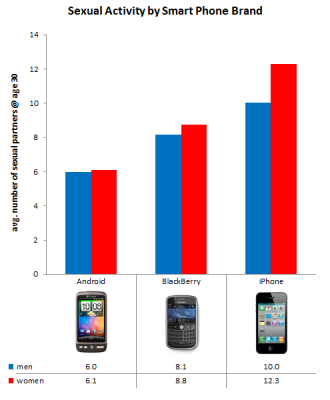
... And I call BS, but more on that later. So, the folks over at OkCupid just put up an interesting article about ways to avoid "being ugly." From their data as seen above, they are recommending that users steer away from Android devices because Android users seem to get less action than their iPhone (and BlackBerry) counterparts. Who knows, maybe it is because we have porn. Join me past the break and we can discuss this a bit more, shall we?
The folks over at 9to5Mac have kept up their investigation of FaceTime over 3G with a quick and dirty data usage analysis. Lest you've forgotten, jailbreaking Apple's Quattro permits walled garden escapees to FaceTime each other using dusty old 3G, and now we've got some numbers to show how much of an impact doing so will have on your bandwidth allowance. A 5-minute call resulted in 14.7MB of data transfers -- including both uploading and downloading -- for the 3G-riding iPhone, which breaks down to a rate slightly lower than 3MB per minute. That's not too horrible when you consider some streaming services use that much just to feed you video of England embarrassing itself in global football tournaments. Then again, we'd be remiss not to note that Fring does it at a claimed 1MB a minute and sans the jailbreak -- but who are we to begrudge having more options?
It's the moment that many of you have been waiting for: the Dev-Team's ultrasn0w carrier unlock for iPhone 4 is out. You'll find version 1.0-1 of ultrasn0w in Cydia on jailbroken devices. If not, just add the repo666.ultrasn0w.com repository. It works for iPhone 4 baseband 01.59 and 3G/3GS basebands 04.26.08, 05.11.07, 05.12.01 and 05.13.04. If none of this makes sense then you've got no reason unlocking your device in the first place, buddy.
While the new iPhone 4 jailbreak is relatively easy to perform and can get users up and running in no time to add new features and functions to their iPhone, the process does expose a security vulnerability that would make it easy for thieves and malicious hackers to steal your messages, phone book, and other items. Even if you're not on an iPhone, you're not safe as your friends who have a jailbroken iPhone with your information on it can leave your information vulnerable.
According to BGR, the exploit works by taking advantage of the PDF viewing capabilities:
This is done through the jailbreakme PDF exploit. Under this method, it would be possible to steal your address book, text message database, or much worse. There is going to be a security solution soon though, as BGR has been informed that a plugin named PDF Loading Warner” has been created to combat this potential security risk. It works by hooking into the device system and will display a warning before a PDF can be displayed. If you install this plugin and navigate to a website that should not be showing a PDF and get this warning, you are able to click “Cancel”, blocking the PDF from loading and subsequently stealing your data.
The forthcoming patch does not patch up the vulnerability in iOS 4, but rather give users more control, much like how desktop operating systems now ask if you want to run an executable program.
It's been about 24 hours since I've jailbroken my iPhone 4. This is my first jailbreak experience, and while the actual jailbreaking was super easy, the aftermath was a bit confusing. After you jailbreak, you get an icon on your homescreen that launches Cydia, an repository of "packages" that include a vast array of apps that can tweak your phone. It's really up to you to figure out which packages to install, but with a little searching and asking on Twitter, you'll soon be pointed in the right direction.
On the iPhone 3GS and previous iPhone devices, jailbreaking often meant having to deal with a slower device with reduced battery life. The iPhone 4, thanks to the boost in battery capacity and CPU speed, can handle more tweaking than its predecessors. In the last day, I've noticed that my device is slightly slower and more power hungry, but not enough to impact usability.
So what have I done thus far? I've used IntelliScreen to allow me to see email previews right from my lock screen, MyWi to turn the iPhone into a WiFi router, WinterBoard to load themes, SBSettings to enable an easy way to toggle on various system radios, MIM to change the carrier name in the upper left corner, and Five Icon Dock to increase the number of allowed icons in the dock to five. Most of what I've done so far has been to make iOS feel as usable as Android and Windows Mobile, which can do many of the things I mentioned above out of the box (or without rooting/unlocking/HardSPL'ing). I'm looking forward to exploring more of the wonders of jailbreaking over the coming weeks.
Have you jailbroken an iOS device before? If yes, what are some must-have tweaks that have made a big difference in that usability of the device?
We'll call this a mid-level difficulty hack we know many are interested on. One of those really cool iPhone 4 features that we wish wasn't restricted is FaceTime calls being limited through Wi-Fi. It sort of becomes pointless to have such a feature and not be able to use it in every scenario thinkable. Well, for those of you who've already taken the Jailbreak plunge, you'll be happy to know there's a way to get it working with a little help from Cydia.
As it turns out, the Jailbreak doesn't really liberate FaceTime to work through 3G form the start, but Cydia offers an app called My3G which tricks the phone into thinking it's got Wi-Fi when it's really connected through 3G. The result is having FaceTime work implicitly through 3G because the phone thinks it's using Wi-Fi once My3G is running. Here are the steps to get it working:
1) Jailbreak your iPhone 4 via www.jailbreakme.com. 2) Download and upgrade to the latest Cydia package. 3) Open Cydia, Go to Manage then Sources. 4) Click Sources, Edit then add: http://apt.modmyi.com 5) Search for "My3G" -- download, and install it. 6) Go through the Rock setup process with a username and password. Open My3G and leave all settings on the default. 7) FaceTime should now work over 3G! -- Make sure to "Forget" the WiFi network you are on (via iOS settings) if you want to test it.
See Apple.. That wasn't so hard! Here's a short video of it working:
What Galaxy S is aesthetically similar to iPhone no doubt. Galaxy D which has an interface Touch Wiz 3.0 reminiscent of the iPhone UI is clear. But the arrival of the new beta of I9000XXJP3 Frøyaor seem to lead towards a similarity almost embarrassing.
Think you have the functionality of IOS on a system Android Frøya, with video calling, hardware similar to the iPhone 4 and all of the software introduced with the Touch Wiz is a really strange effect.
No denying it, the copy is clear. What's Wrong With a copy of what happened and propose a system among the best on the market?
So here we will soon see what the next version of Galaxy S.
* System of selection, copy and paste very similar with a magnifying glass or zoom box
* Same graphics for the context menu with the difference that S Galaxy offers more options. Share it lets you share with Gmail, SMS or Bluetooth (and sure Twitter and other software very soon, or if installing third-party programs) the selected text. The search shows rather good choices:
New icons for programs and in particular for the notification system.
As we can see has been implemented reporting unread SMS with the meter (this far only Samsung app store). Most likely the flow will also feature on Mail, Telephone and Facebook is on the Market Samsung.
* Screenshots! News really important. The images you see we made with our Galaxy S without Root. How many will root without the screen are not possible, but Samsung has implemented a system to create iPhone-style screen shots. o Holding the back button (arrow) and press and hold the back, home button, a screen will be saved in the folder PNG screenshot 8GB. * New icons for the layout of the screen power off:
News Finally, for the Task Manager that we saw in the last Roma capabilities have been added for the control of RAM and active processes
What about .. This was the third beta in less than 24 hours for Galaxy Frøya S and every time the news are many. Still the work is hard and the rom does not offer any new features that Frøya introduced mainly at the kernel level, JIT compiler and overall speed. The road taken and the news we like to have this pattern, S Journal Frøya for Galaxy will change the face on the telephone.
Back when we outlined the iOS 4 features missing from iPhone 3G, we forgot one key bullet point: performance. As more and more two-year veterans of Apple's phones have taken the plunge and upgraded to the latest firmware, slowdown and battery drain issues have become a common complaint, which is even more irksome when you think of just how little the update really adds to the UI. The Wall Street Journal reports speaking to an Apple spokesperson who said the company is looking into the matter. That doesn't necessarily mean a fix is coming anytime soon, but hey, at least you can hold the darn thing however you want.
Developers, developers, developers: Apple is now seeding the second iteration of the iOS 4.1 beta your way. It's been just shy of two weeks since beta 1 hit the scene, which is about on par with the pace of revisions for previous beta releases. We haven't had a chance yet to dive in and see what changes are afoot, but we're downloading now and will be sure to let you know if we notice anything.
Cellphones, Mobile Handsets Android 2.2 (Froyo) versus iOS 4: the browser showdown (video) By Richard Lai posted Jul 7th 2010 1:56PM Hands-On 6diggsdigg A little while back Google boldly claimed that Froyo would have the world's fastest mobile browser, but the lack of final software back then meant we'd had to tie up our itchy hands until now. And boy, it sure looks like it was worth the wait -- Ars Technica's JavaScript benchmarks show that not only is Froyo's browser almost three times faster than its Éclair counterpart, but it also beats iOS 4's Safari by at least two-fold. That said, numbers alone don't always reflect real-life performance -- especially with Froyo supporting iPhone's much-missed Flash -- so we went ahead and conducted our own browser speed test. Read on for our videos and results after the jump.
Our test candidates were a 16GB iPhone 4 (with a shameless color mod) and a Nexus One rocking the official OTA 2.2 update and Flash 10.1. Naturally, we cleared out the cache files on both devices prior to each trial. Out of the five desktop-version websites that we tested for load time, three of them -- BBC News, gdgt and The Onion -- repeatedly produced a tie between the two phones, whereas the iPhone 4 consistently loaded Engadget about two to three seconds faster, and the Nexus One about one to two seconds faster with New York Times. Here's our video of one of the trials:
Cellphones, Mobile Handsets Android 2.2 (Froyo) versus iOS 4: the browser showdown (video) By Richard Lai posted Jul 7th 2010 1:56PM Hands-On 6diggsdigg A little while back Google boldly claimed that Froyo would have the world's fastest mobile browser, but the lack of final software back then meant we'd had to tie up our itchy hands until now. And boy, it sure looks like it was worth the wait -- Ars Technica's JavaScript benchmarks show that not only is Froyo's browser almost three times faster than its Éclair counterpart, but it also beats iOS 4's Safari by at least two-fold. That said, numbers alone don't always reflect real-life performance -- especially with Froyo supporting iPhone's much-missed Flash -- so we went ahead and conducted our own browser speed test. Read on for our videos and results after the jump.
Our test candidates were a 16GB iPhone 4 (with a shameless color mod) and a Nexus One rocking the official OTA 2.2 update and Flash 10.1. Naturally, we cleared out the cache files on both devices prior to each trial. Out of the five desktop-version websites that we tested for load time, three of them -- BBC News, gdgt and The Onion -- repeatedly produced a tie between the two phones, whereas the iPhone 4 consistently loaded Engadget about two to three seconds faster, and the Nexus One about one to two seconds faster with New York Times. Here's our video of one of the trials:
At this point we thought: would things load quicker with Flash uninstalled? Turns out it's a small yes -- this time the Nexus One consistently loaded Engadget, New York Times, gdgt and The Onion a tad quicker than the iPhone 4, whereas BBC News produced a tie. Still, this is far from the massive performance jump that Ars Technica's benchmarks suggest (not that we're saying the site did it wrong), but for now it does look like Android's just about won this two-man race. Apple, your move next.